
VB.NET Read Text File – ReadAllText, Encoding, Async (2026)
With File.ReadAllText you can read a text file in VB.NET in just a few lines. This post covers the simple variant, reading with UTF-8 encoding, and the asynchronous version available since .NET 5 – with complete example code.
Code – Read a Text File in VB.NET
Required Class(es)
First, let’s look at which existing classes from the Microsoft .NET Framework we can use. In the framework documentation, we find the File class, which – as expected – allows us to perform file-based operations.
Required Method(s)
The methods we need for our example can be found under the term „Read“:
ReadAllText(path)
Our first and simplest method is ReadAllText, which opens a text file, reads its content, and then closes the file again.
ReadAllText(path, encoding)
Same as the method above, but here we can specify an Encoding to ensure special characters like umlauts are displayed correctly.
ReadAllTextAsync(path, cancellationToken)
Returns the entire content of the text file as a string. This is particularly useful for large files where you don’t want to block the UI thread.
Note: This method is only available in .NET 5+ applications, not in .NET Framework apps.
Let’s Go – Read a Text File in VB.NET
To start, create a simple UI with 2 labels, 2 textboxes, and a button like this:
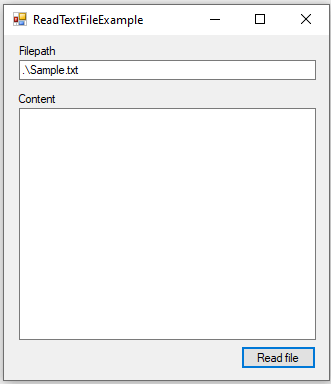
Once the controls are properly named, we can start with the button’s code:
Private Sub btnReadFile_Click(sender As Object, e As EventArgs) Handles btnReadFile.Click
    Dim filepath = tbFilepath.Text.Trim()
    If Not File.Exists(filepath) Then
        MessageBox.Show("Please provide an existing filepath..")
        Return
    End If
    ReadFileSyncSample(filepath)
End Sub
First, we grab the file path from the textbox and use Trim() to remove any leading or trailing whitespace.
Then we check if the specified file path exists and immediately exit the sub – following the early return principle – if it doesn’t.
After that, we call the reading method.
The Reading Process
Simple
Here is a simple example of how to read a text file in VB.NET and display it in our tbContent textbox:
Private Sub ReadFileSyncSample(filepath As String)
    Dim contents = File.ReadAllText(filepath)
    tbContent.Text = contents
End Sub
With Encoding
Alternatively, we can specify an encoding for the reading process to ensure special characters like umlauts are displayed correctly:
Private Sub ReadFileSyncSampleWithEncoding(filepath As String)
    Dim encoding = System.Text.Encoding.UTF8
    Dim contents = File.ReadAllText(filepath, encoding)
    tbContent.Text = contents
End Sub
Asynchronous Since .NET 5
Finally, since .NET 5 there is also an asynchronous variant, which is particularly beneficial for file operations with large files:
Private Async Function ReadFileAsyncSample(filepath As String) As Task
    Dim contents = Await File.ReadAllTextAsync(filepath)
    tbContent.Text = contents
End Function
Want to write text files as well? Check out VB.NET write text file.
FAQ
Use File.ReadAllText(path) from the System.IO namespace. It opens the file, reads the entire content as a string, and closes the file automatically.
Pass the encoding as a second parameter: File.ReadAllText(path, System.Text.Encoding.UTF8). This ensures special characters like umlauts are displayed correctly.
Yes. Since .NET 5 you can use Await File.ReadAllTextAsync(path). This is especially useful for large files where you don’t want to block the main thread.
No. ReadAllText and ReadAllTextAsync handle opening and closing the file internally. You don’t need a Using block or manual Close() call.
Complete Code – Read a Text File in VB.NET
Imports System.IO

Public Class Form1

    Private Sub btnReadFile_Click(sender As Object, e As EventArgs) Handles btnReadFile.Click
        Dim filepath = tbFilepath.Text.Trim()
        If Not File.Exists(filepath) Then
            MessageBox.Show("Please provide an existing filepath..")
            Return
        End If
        ReadFileSyncSample(filepath)
        ' ReadFileSyncSampleWithEncoding(filepath)
        ' ReadFileAsyncSample()
    End Sub

    Private Sub ReadFileSyncSample(filepath As String)
        Dim contents = File.ReadAllText(filepath)
        tbContent.Text = contents
    End Sub

    Private Sub ReadFileSyncSampleWithEncoding(filepath As String)
        Dim encoding = System.Text.Encoding.UTF8
        Dim contents = File.ReadAllText(filepath, encoding)
        tbContent.Text = contents
    End Sub

    Private Async Function ReadFileAsyncSample(filepath As String) As Task
        Dim contents = Await File.ReadAllTextAsync(filepath)
        tbContent.Text = contents
    End Function

End Class